
What a week of transactions looks like in KeyFlow
Oct 10, 2026 · 8 min read
Five deals under contract, two buyers still looking, and a closing that is about to move whether you like it or not. That is the week below, one day at a time, on the screens you would actually be using.
Each day starts with what lands on your desk. Then the screen, and what the same moment costs when the deal lives in a spreadsheet, a calendar, and a text thread.
Monday: the contract comes back signed
What lands: the executed purchase agreement, as a PDF, ten minutes before your next showing.
Open the deal and press Upload Contract and Extract Data. KeyFlow reads the PDF and gives you a review screen with the address, the contract and closing dates, the price, the earnest money, and the day count for each contingency. Anything it was less sure of is marked Verify. Every field is editable.
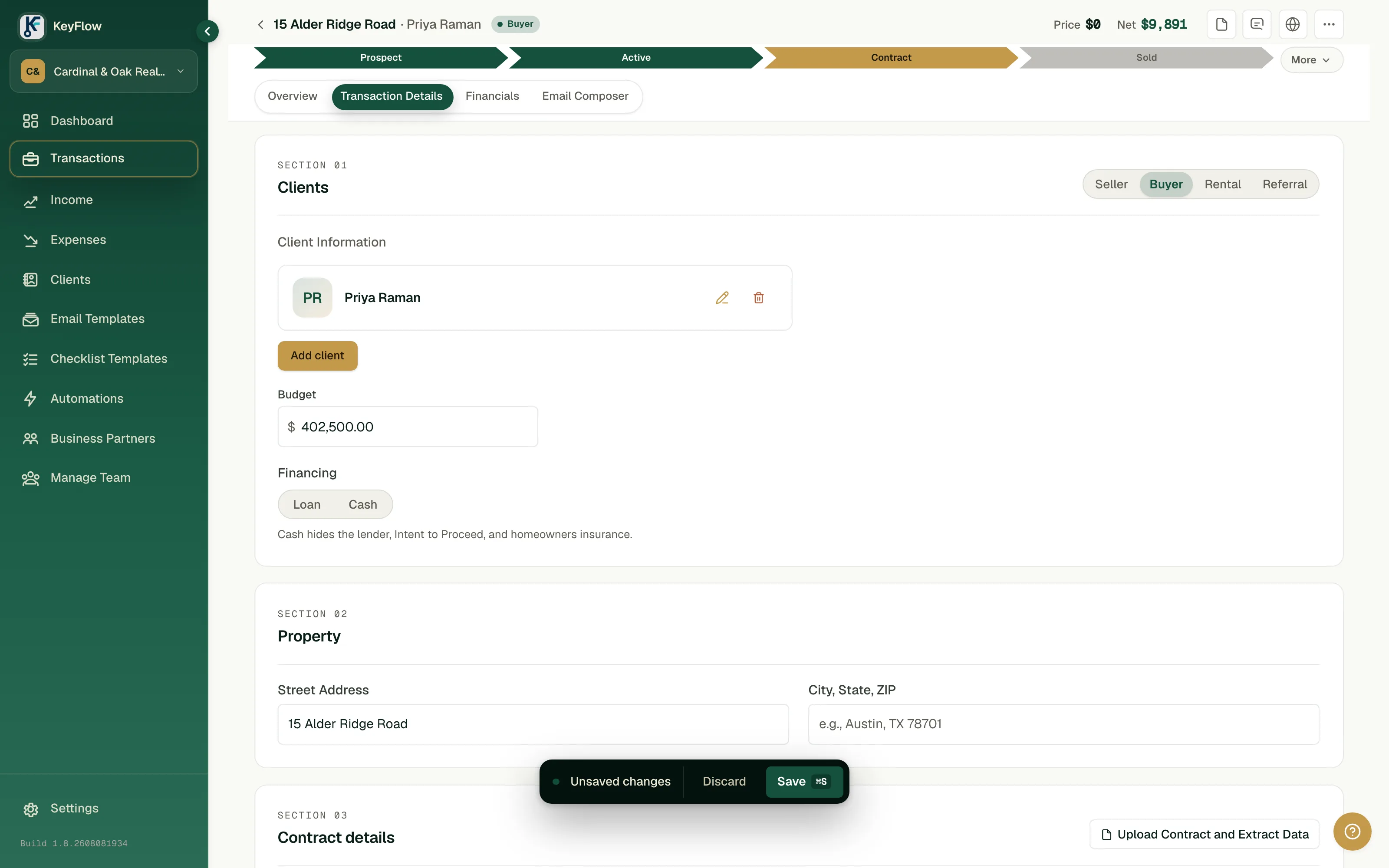
Nothing saves at that point. Apply to Form drops the values into the deal as unsaved changes, the bar at the bottom of the screen above, and they stay unsaved until you press Save. Two approvals, on purpose. A misread date that saved itself would become the date everyone works to, and you would find out when somebody missed it.
Two things it will not do. It does not read the buyer's or seller's names, so you add your clients yourself. And it overwrites whatever is already typed in the fields it fills, so extract first and hand-edit after.
Once you save, the deadlines exist. Earnest money, inspection, intent to proceed, and homeowners insurance count forward from the contract date. Consideration counts from the end of inspection, and settlement from the end of consideration. Clear to close lands three days before closing, a buyer's final walkthrough the day before. You typed none of them.
By hand, you copy every one of those dates into a spreadsheet, then again into your calendar, and count days twice. Two copies that have to agree forever.
Wednesday: the lender needs nine more days
What lands: a text from the loan officer. Underwriting needs more time.
Change the closing date. On the deal's closing path you can do it on the date itself, and before you confirm, KeyFlow shows the deadlines that shift with it, clear to close in this case. The walkthrough follows on its own, since it is counted from closing. Add a reason if you like. The change goes into the deal's log with your name, the old date, the new one, and everything it pulled along.
Here is the buyer deal in Friday's screenshot further down, as it stood before the call, with its closing pushed nine days:
| Date | Counts from | Before | After |
|---|---|---|---|
| Closing | You set it | Aug 17, 2026 | Aug 26, 2026 |
| Final walkthrough | 1 day before closing | Aug 16, 2026 | Aug 25, 2026 |
| Clear to close | 3 days before closing | Aug 14, 2026 | Aug 23, 2026 |
| Inspection, earnest money, insurance | The contract date | Unchanged | Unchanged |
The last row is the one people get wrong. Contingency deadlines count from the contract date, so a later closing does not buy your buyer a longer inspection period. Moving the contract date is what re-dates the whole chain, a case we walk through in one date moves and six deadlines move with it. Your contract governs, and none of this is legal advice.
Anything you already checked off stays where it happened. The inspection took place on the day it took place.
One limit worth knowing. KeyFlow counts calendar days, which is why clear to close above lands on a Sunday. If your form counts business days, check those dates against the contract.
If you have turned on the Google Calendar sync, the calendar copy moves too. By hand, one fact becomes four edits: the spreadsheet, the closing on your calendar, the walkthrough, and a text to the buyer. The one you forget is the one that costs you.
Friday: "did the appraisal come back?"
What lands: your buyer, texting while you are in the middle of a showing.
She already has a link. She opens it, types her last name, and sees her own deal. The countdown, the dates, the closing path with what is cleared and what is next, and the checklist you attached for her. When she ticks an item, it is ticked on your side too.
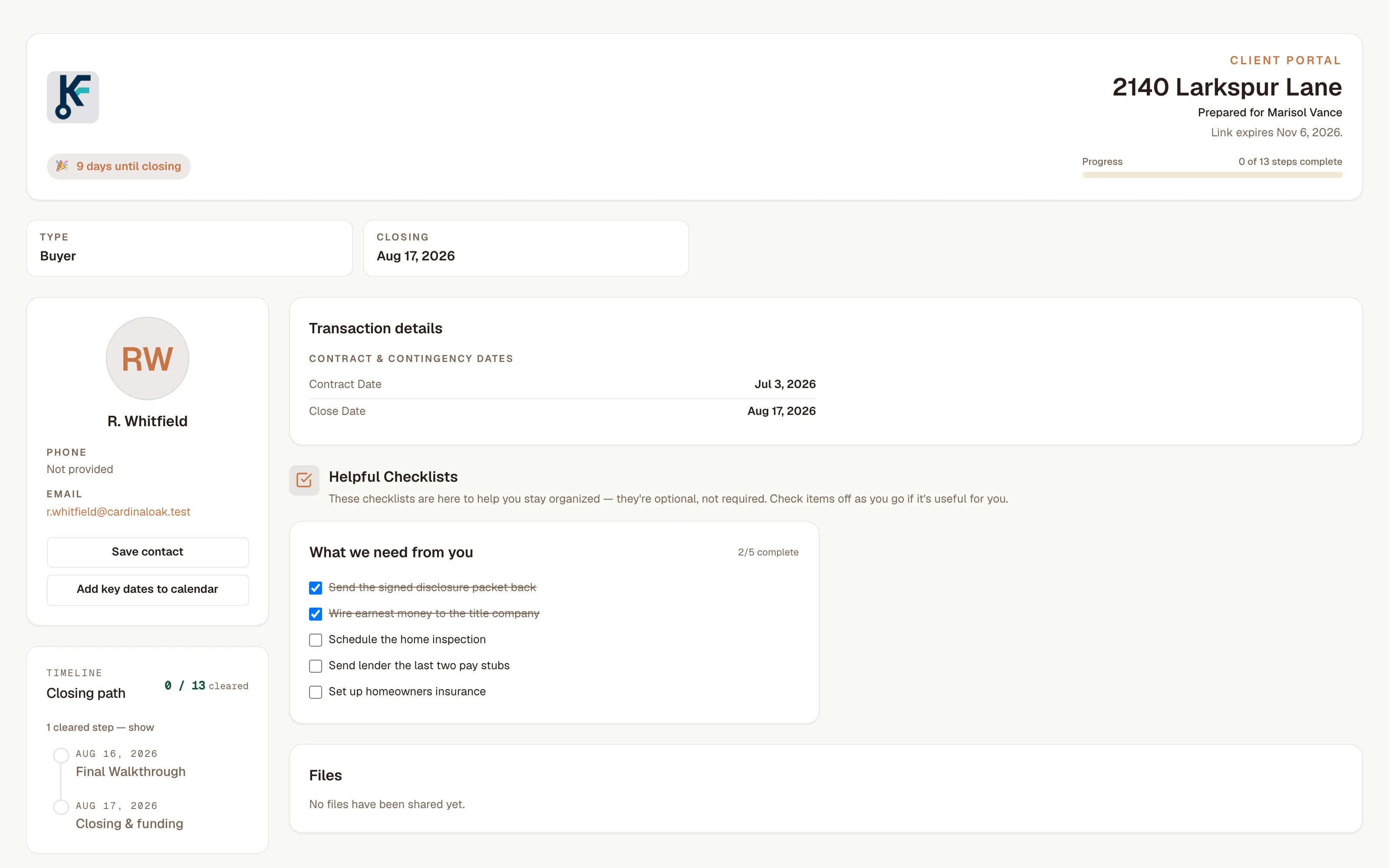
The page shows her the price, the earnest money, and the dates. Your commission is not on it. Her checklist is the short one you picked for her, because showing a buyer your own task list only makes her anxious about things she cannot act on. The last-name check has its own article: why the client portal has no password.
What KeyFlow will not do here is text her. The texts it sends go to you and the people on your team, and only to someone who added their own number and opted in. Email to a client goes from your own Gmail, from the deal, when you press Send. The AI will draft it for you. It will not send it.
There is no inbox, either. Her reply lands in your Gmail or on your phone, where it always did.
By hand, you call her back after the showing, dig the appraisal out of your notes, and have the same conversation with her co-buyer on Saturday. The measure of the portal working is a call you never get.
Through the week: the money keeps up
What lands: a buyer's budget is final, and you want to know what the deal is worth to you.
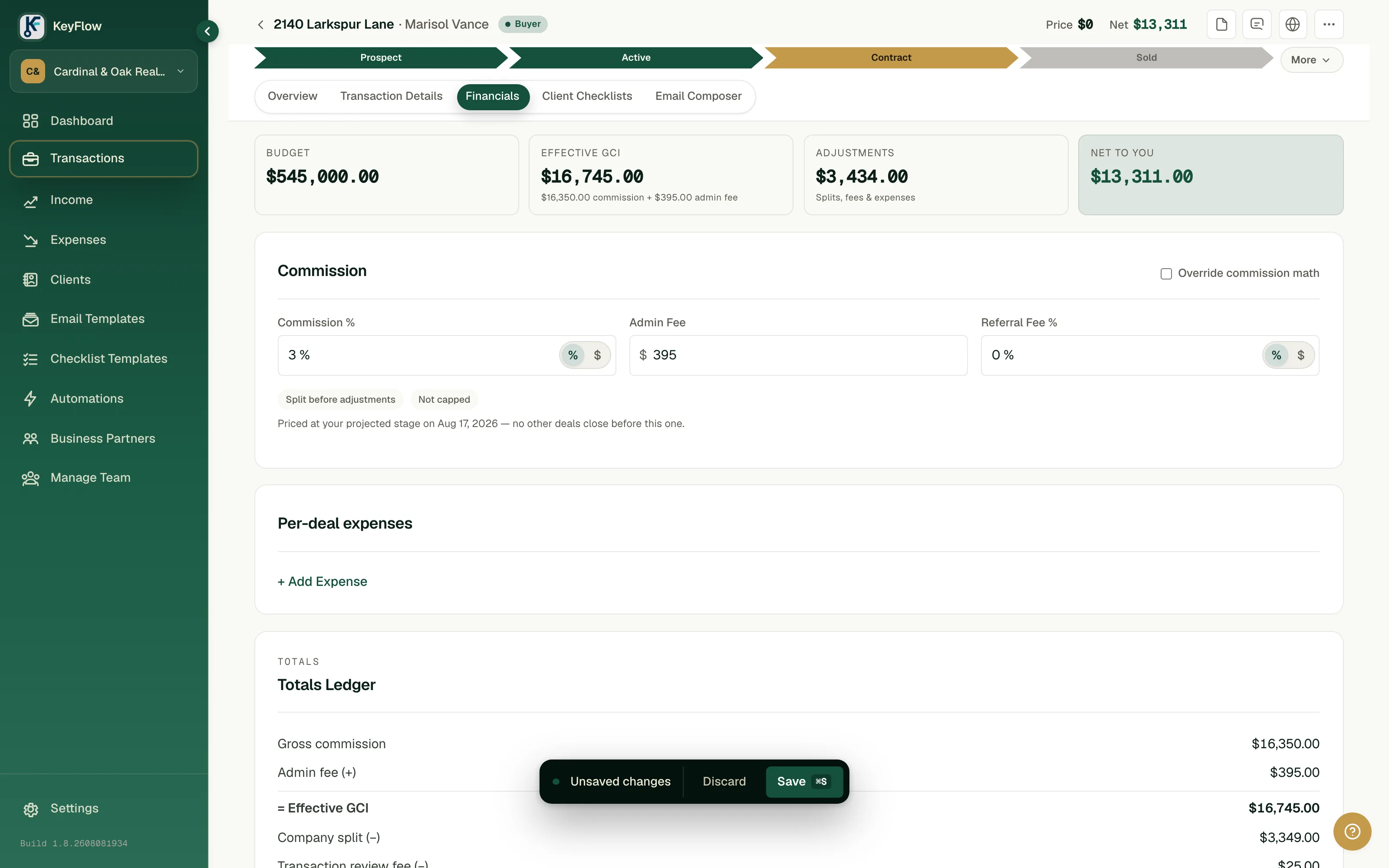
The arithmetic on that screen, so you can check it:
| Line | Amount |
|---|---|
| Gross commission, 3% of $545,000.00 | $16,350.00 |
| Admin fee added | $395.00 |
| Effective gross commission | $16,745.00 |
| Company split, 20% | −$3,349.00 |
| Transaction review fee and other deductions | −$85.00 |
| Net to you | $13,311.00 |
The line under the commission fields matters more than any of those numbers. It says the deal is priced at your projected stage on Aug 17, 2026, with no other deals closing before it. Where a deal lands against your cap depends on what closes ahead of it, so KeyFlow prices your open deals in closing order. You enter your company split and your cap once, in settings. If your plan works some other way, any deal's math can be overridden by hand.
When a deal closes, its number is settled and stays put. Nothing later re-prices it, which is why the figures you gave your accountant in April still reproduce in October. We shipped the opposite mistake once, a list header that disagreed with the rows printed under it, so this is the rule we check first.
Expenses attach to the deal they belong to. The photographer, the sign, the courier.
By hand, a commission spreadsheet where every row is a formula reading this year's running cap total. The day you cross the cap, every deal you already closed quietly changes. Most of those spreadsheets are wrong from the day they are built, and nobody notices until tax season.
Month end: the numbers were never separate
What lands: the first of the month, and a request from whoever does your books.
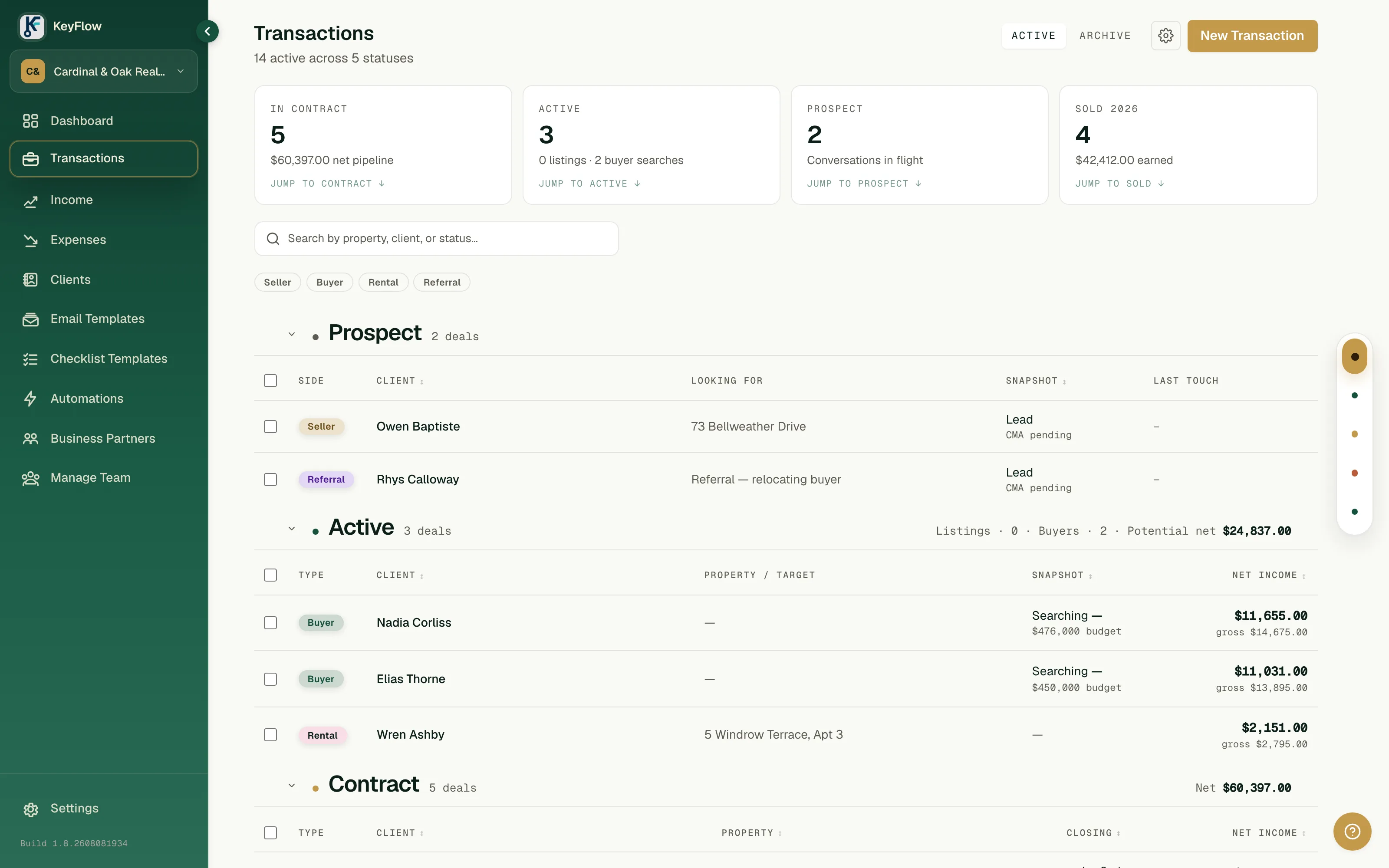
The pipeline already says it. Four closed this year for $42,412.00, five under contract worth $60,397.00 net. Income and Expenses filter to this month, last month, or the year. When your accountant wants files, Settings exports your transactions, contacts, vendors, income, and expenses as CSV, in one download.
By hand, this is the evening you spend reuniting a spreadsheet with a folder of receipts.
If someone works the files with you
Invite your transaction coordinator (TC) or assistant into your workspace and they work the same deals: the same dates, the same closing path, and the same log, which names whoever moved what. A coordinator can switch on Transaction Coordinator Mode, which hides Income, Expenses, and each deal's Financials tab so the screen stays on dates and checklists. It is a view they choose. It is not a lock.
You own the account either way. Your workspace, your data, and it goes with you if you change brokerages.
Try it on one deal this week
Pick a deal that is already under contract. The free plan keeps your transactions, deadlines, and checklists for one person, with no time limit. It does not include contract reading or the client portal.
- Enter the deal with the contract date, the closing date, and the day counts from the agreement.
- Check every deadline KeyFlow gives you against your own calendar.
- Move the closing a week and see what follows and what stays put.
If the dates hold up, start the 14-day trial on a paid plan. A card is required up front, and nothing is charged until day 14. Upload the same executed contract, compare what it reads with what you typed, and send your buyer the portal link before she has to text you.
- product
- transactions
- workflow