Skip to content

KeyFlow · Transaction management

Most agent software is built for the brokerage. This one is built for you.

Your pipeline, your contracts, your cap and commission math, and the portal your client actually sees — in one app. You are the account holder, not a seat in someone else's.

Private beta · Free while it lasts · No card

A detail of the KeyFlow transaction list: deals grouped by stage, each row carrying client type, property address, stage, and close date.

Fictional workspace — synthetic clients and addresses.

How to read this page

Six figures in four parts, following one deal from the day it lands to the day the year closes. Each figure is a screenshot of the running app, annotated. Nothing below is a mockup drawn for this page — it is the software, loaded with a fictional workspace so no real client's file appears here.

Part one

The file, before it is a file.

Fig. 01 – 02

FIG. 01

Every deal, on one surface.

You can see where every file stands without opening one of them, which is most of what you need on a Tuesday morning.

The KeyFlow transaction list showing deals grouped by stage, each row carrying client type, property address, stage, and close date.

Fictional workspace — synthetic clients and addresses.

01
Grouped by stage. Under contract, pending, clear to close. The list ends up matching how you would describe your week to someone.
02
Buyer, seller, lease, referral. Each priced differently underneath, and marked so you never have to remember which is which.
03
A deal with no close date is still a deal. Your buyer who is still house-hunting appears here. Software that hides her until she closes is describing a pipeline you do not have.
04
Last year moves out of the way. Prior-year files archive themselves at the turn of the year and stay one click back for when the tax question comes.

FIG. 02

Start from the contract you already signed.

Drop the executed purchase agreement in. Parties, price, dates, and contingencies come back populated, with every extracted value sitting next to the field it filled so you can check the work.

The KeyFlow contract extraction view, with values pulled from an uploaded purchase agreement populated into the transaction's key-dates fields.

Fictional workspace — synthetic contract.

01
Key dates compute themselves. Inspection, financing, appraisal, and walkthrough derive from the accepted date and the terms you agreed to.
02
You approve every value. Extraction fills the fields and then waits. Nothing reaches the file until you have read it and accepted it, so a misread date cannot quietly become the date everyone works to.
03
Contingencies become a closing path. The dates you just accepted turn into the milestones the rest of the file runs on.

Part two

Then the part that is actually yours.

Fig. 03

FIG. 03

The number nobody else will model: your cap.

Gross commission, company split, fees, and what actually lands in your account — per deal and against your cap for the year. This is the figure your brokerage's software does not draw, because it is not their number.

The KeyFlow financials view showing a commission breakdown from gross to net alongside a cap progress meter for the year.

Fictional workspace — synthetic figures.

Worked example — not a screenshot

$16,000 cap · 80/20 · $285 fee

Company dollar paid this year

$8,000 of $16,000

$40,000 this year

The same deal, priced where you are

325 Larkspur Lane

$325,000 · 3.00% · Buyer side

Gross commission $9,750.00
Company split (20%) −$1,950.00
Transaction fee −$285.00
Net to you $7,515.00

Pre-cap

Every dollar of this deal still splits with the company. Drag right to move through the year.

01
Gross to net, line by line. Every deduction named. No single "your commission" figure you have to reverse-engineer.
02
Your cap changes what a deal is worth. Deals you close on the way to capping pay out differently from the ones after it. Each is priced at the position you were actually in the day it settled.
03
Last year's books hold still. A deal's numbers are kept the way they settled, so adjusting a split next quarter cannot reach back and reprice a closing you have already reported.
04
Seller net sheets and buyer estimates come out as PDFs. The document you already hand across the table, generated from the file instead of a spreadsheet.

Part three

The side of it your client can see.

Fig. 04 – 05

FIG. 04

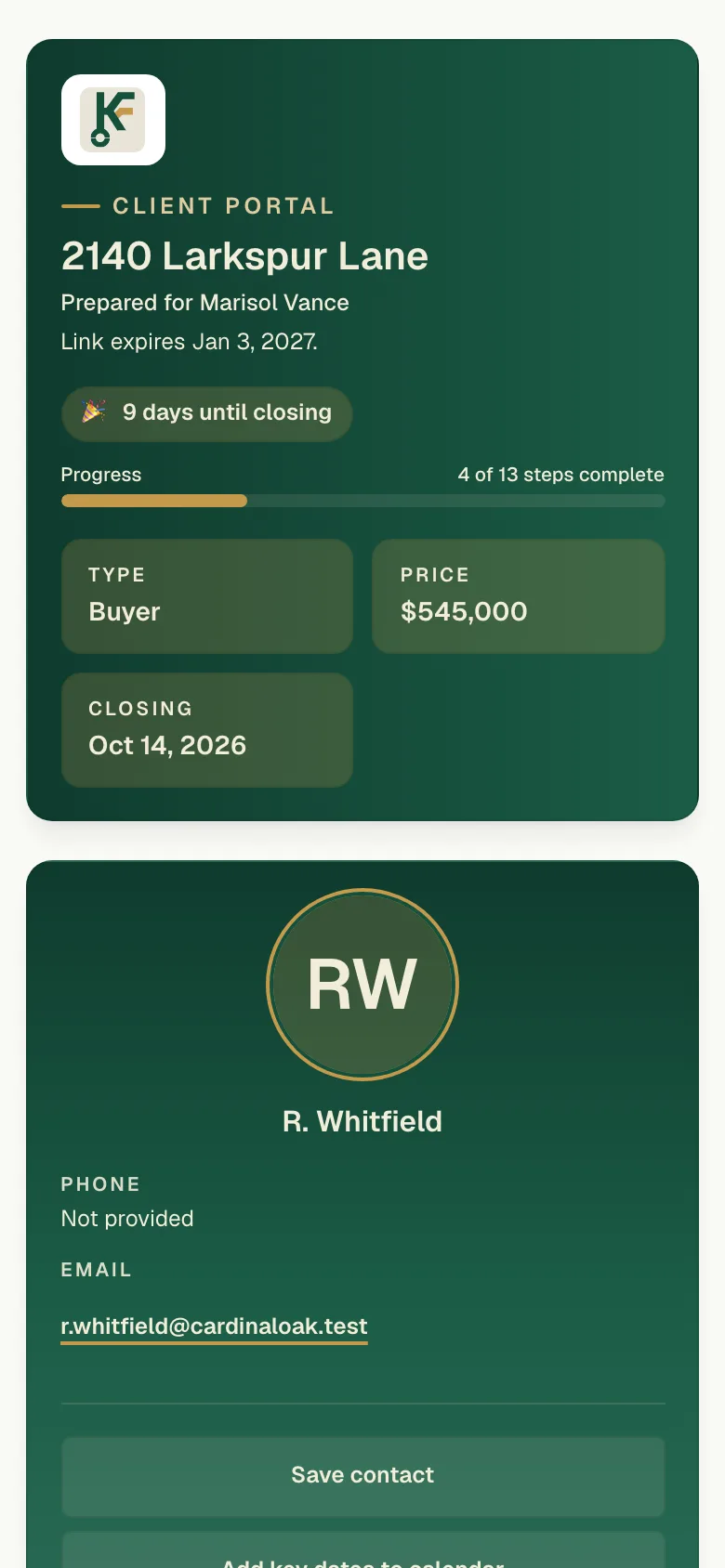
What your client sees.

One link, your branding, no account to create. The annotations on this figure are written from your buyer's side of the table, because that is who reads it.

The KeyFlow client portal as a buyer sees it: property status, closing path milestones, checklist items, and shared documents.

Fictional workspace — synthetic client and property.

01
"Where are we?" Answered before she asks. The closing path shows what is done, what is next, and when.
02
"What do you need from me?" Her checklist items, separate from yours, in plain language.
03
"Who am I working with?" Your name, your photo, your brand — not ours. The portal reflects credit onto you, which is the entire point of it.
04
She verifies with her last name. No password, no signup, works on the phone she is holding. Older and non-technical clients get through it.
FIG. 05

Texts that are boring on purpose.

Milestone updates by SMS and email, sent from your file. Consent is collected before anything goes out, and the opt-in screen below is the one your client actually sees.

The KeyFlow messaging settings alongside the consent screen a client sees before any SMS is sent.

Fictional workspace — synthetic recipient.

01
Consent comes first. Your client agrees on that screen before anything sends, and a reply of STOP ends it on the spot.
02
Milestones are what trigger them. A message goes out when something on the file actually moves. Any category you would rather send yourself can be switched off.
03
Phone numbers are never sold or shared. They are used to send your client updates about their own transaction, and nothing else. Privacy · Terms.

Part four

And then the year has to add up.

Fig. 06

FIG. 06

Closing the month, and then the year.

Income and expenses against the deals that produced them, so the question at the end of a month is a lookup rather than an evening with a spreadsheet.

The KeyFlow dashboard showing income by month, expense totals, and year-to-date net against closed transactions.

Fictional workspace — synthetic figures.

01
Every expense against a deal. Or against the business, when it belongs there. Both roll into the same year-end picture.
02
Your data leaves whenever you want. Full CSV export of transactions, contacts, income, and expenses, from a button in Settings. You do not have to ask anyone for it.
03
Closing anniversaries come back around. Past buyers resurface a year later, which is where your next listing tends to come from.

Questions worth answering

Not covered here? hello@keyflow.homes

My brokerage already gives me transaction software. Why this?
Because theirs is built for compliance and oversight — it exists so the brokerage can see the file. It does not model your cap, your split, or what you personally clear on a deal, and it goes away when you change brokerages. This is your account, with your data, following you.
I have an assistant and a transaction coordinator. Does that work?
Yes. You can extend access to the people who work your files with you, and the workspace stays yours — they work inside your account rather than you working inside theirs. That is the same distinction the rest of this page is about, and it matters more with a team than without one: a lead who changes brokerages has more to move.
Does it use my state's forms?
KeyFlow does not generate or file contracts. It reads the executed contract you already use and manages the transaction around it — dates, checklists, money, and communication.
How much does the AI decide on its own?
Nothing. Contract extraction proposes values and drafts emails; you approve or edit before anything is saved or sent.
Will it text my clients without permission?
No. See Figure 05 — consent is collected on a screen your client sees, per client, before anything sends. STOP ends it immediately.
Can I get my data out?
Yes, as CSV, whenever you want, without asking anyone. Figure 06, callout 02.
Who is behind it?
Interactive MM, LLC. KeyFlow is pre-launch and in private beta — there is no customer list to show you yet, which is why this page shows the software instead.

The tool you wanted three closings ago.

The beta is small on purpose, so the people in it get answered. Tell us roughly how many deals you run a year and we will be in touch.

Request an invite

Opens your email app. We use your address to reply about the beta and nothing else. Privacy policy.