
Why your client portal has no password
Sep 26, 2026 · 5 min read
Picture the client on the other end of your link. Say she is in her sixties and selling the house she raised her kids in. Nothing unusual there: the typical seller in the National Association of Realtors (NAR) 2025 profile was 64, the oldest on record, and had owned the home for 11 years.
She is in a grocery store parking lot with her phone, and she wants to know one thing: did the inspection happen?
If the answer sits behind "create an account", you already know what she does next. She calls you.
Here is what she gets instead.
1. A text from you
The link comes from you, through whatever you already use to reach her: a text, an email, or the thread where you sent the contract. KeyFlow does not send it for you; you copy it from the transaction.
It is a long random address that belongs to one transaction. Nobody is going to guess it, and holding one tells you nothing about any other.
2. One box
She taps it. The page says "Verify access" and asks for the client last name.
One box. One button.
The name it wants is the last name of the first client on the file, as it stood when you made the link. Capital letters and accents don't matter, so "o'brien" works for "O'Brien" and "Soren" works for "Søren". Ten wrong names inside an hour locks the link for 24 hours, and during the lockout even the right name is refused. That stops someone working through guesses. It also stops a co-buyer with a different surname, so tell the second buyer which name to type.
3. The page
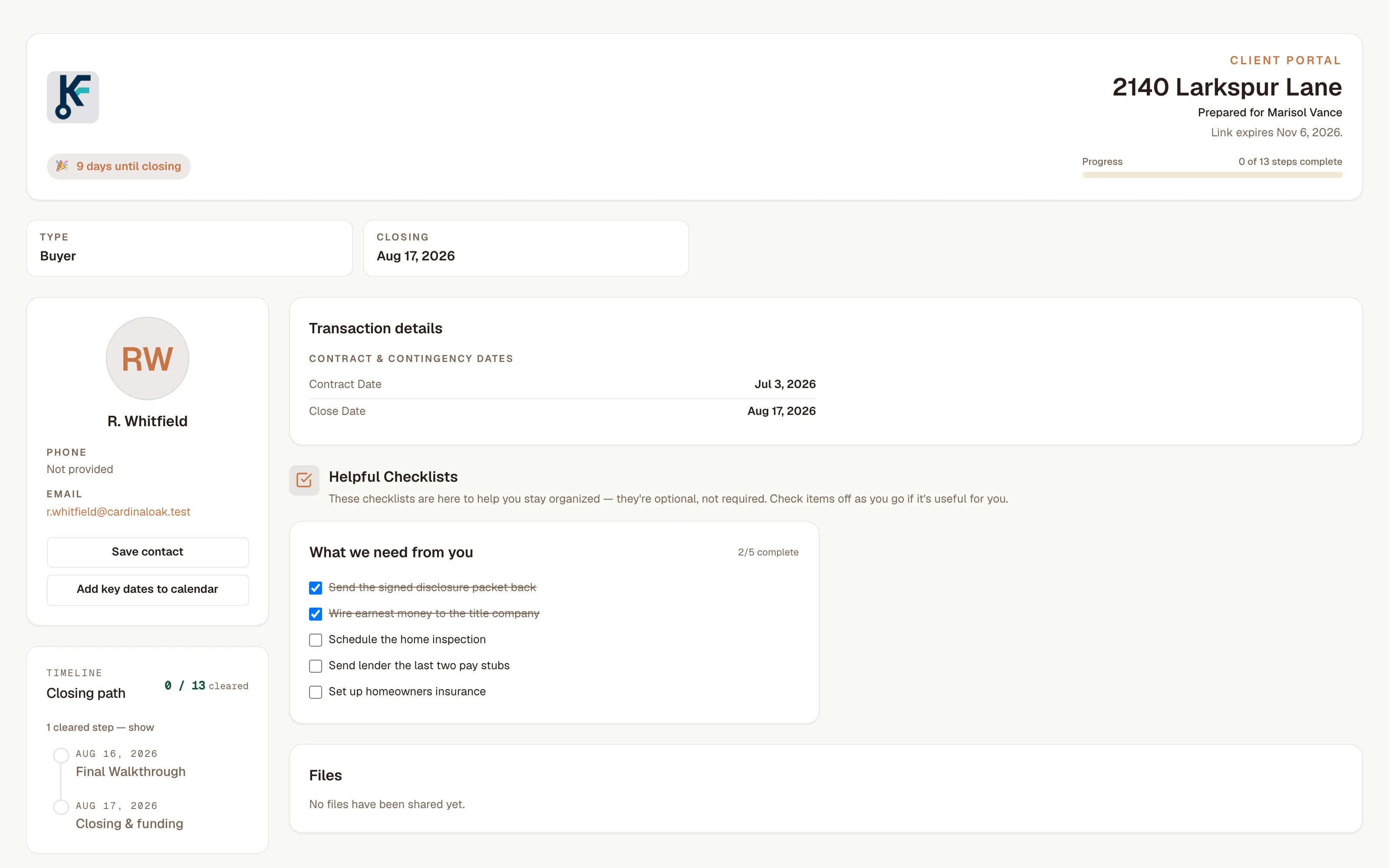
The screenshot is a buyer's portal. Across the top: your logo, the address, her name, the date the link expires, a countdown to closing, and progress along the closing path (0 of 13 steps in the figure). Then your card: a phone number she can tap to call or text, your email, and buttons that save your contact and put the key dates in her calendar.
Then the part that answers the calls you get. The contract and contingency dates. A checklist headed "What we need from you" that she can tick off, and when she does, the item shows on your side as done by "Client". The closing path, step by step. Any files you've attached, which she can download. On a financed purchase, the lender's contact card, and the title company's on any deal that has one. On a listing, the seller net sheet gets its own tab.
What she never sees matters as much. The page never shows your split, your cap, or what you net. Not your notes. Not your own working checklists, because only checklists written for clients can be attached to the portal. A custom milestone you add stays off her page unless you mark it visible to the client. A seller does see the commission rate on her net sheet, since it comes off her proceeds and she signed for it.
4. When it stops working
You set the end date when you create the link. The default is 90 days out and the limit is six months, and it runs through the end of that day. Set it a couple of weeks past closing, so questions about the walkthrough and the final numbers still have a home.
Each visit lasts two hours, then the page blurs and asks for the last name again. To cut access early, regenerate the link, which kills the old one immediately, or disable the portal.
Your side of it
Most calls a client makes mid-deal are some version of three: when do we close, what do you need from me, and who do I call at the lender. The page answers all of them, and the answers are current as long as the file is.
You also see, on the transaction, when she last opened the portal and how many times, so when she calls, you know whether she looked first.
A password would cost you most of that. In a FIDO Alliance survey of 10,010 consumers, published Oct 16, 2023, 70% had reset a forgotten password in the previous two months, and 59% had given up trying to get into an online service at least once in 60 days. Those are people signing in to things they use every week. Your client opens this page a handful of times across a closing. By the second visit the password is gone, the reset email is in a folder she never checks, and you are on the phone. We think a password here would turn away more of your clients than it could ever keep out strangers.
Now the limits, plainly. It is not an inbox: if she wants to answer you, she texts or calls like before, and nothing she types lands in KeyFlow. It does not update itself. If nobody keeps the transaction current, she gets a confident picture of last week. Every file attached to the transaction shows in her Files list, with no way to hide one, so attach nothing you wouldn't hand her. And the portal comes with the paid plans, not the free one.
Match the lock to the door
The realistic threat to this page is a forwarded link: a cousin, a group chat, a screenshot. Whoever opens it still needs the last name, and the link dies on the date you set. A page left open on a shared tablet asks again after two hours. Guessing runs into a random address and a lockout.
What it does not stop is someone who has both the link and her surname. They get in. That is the trade, and if a deal is unusually sensitive, don't share a portal for it. Your brokerage's compliance system should have real logins, because the people using it sign in daily and the wrong reader is costly. A client's status page is the reverse on both counts. What you may share with a client is still your brokerage's call, and none of this is compliance advice.
On your next deal
When the contract is signed, open the transaction, create the portal, set the expiry two weeks past closing, and copy the link. Then text her something like this:
Here's the page for [address], with our dates, what I need from you, and who to call. It updates as we go, and it'll ask for your last name: [link]
Leave the last name itself out of the message. If the text gets forwarded, the name shouldn't travel with it.
Sources: National Association of Realtors — 2025 Profile of Home Buyers and Sellers · FIDO Alliance — consumer authentication study, Oct 16, 2023
- product
- portal
- clients